Table of Contents
- Document Purpose
- Getting Started – First Launch
- Terms and Agreements Screen
- Dashboard Screen
- Create Games Screen
- Generated Games Screen
- Saved Games Screen
- Mark Played Screen
- Played Games Screen
- Validate Numbers Screen
- Game Winners Screen
- Statistics Screen
- Range of Sum Statistics
Document Purpose
Your central hub for quick access to all features and lottery information.
For simplicity purpose, we are using screenshots from the iPhone mobile app, but functionality should be identical for Android users.
Getting Started – First Launch
What Happens When You First Open Lottery Warrior
Initial Setup (15-30 seconds)
When you launch Lottery Warrior for the first time, the app performs several important setup tasks:
- Database Creation – The app builds a local SQLite database on your device to store:
- Complete lottery drawing history (years of Powerball and Mega Millions results)
- Prize tier information for accurate prize calculations
- Your saved games, played games, and winners
- Statistical data for number frequency analysis
- Historical Data Import – We automatically load:
- All past Powerball drawings
- All past Mega Millions drawings
- Prize chart information for both lotteries
- This involves inserting thousands of records, which takes 15-30 seconds
- Service Initialization – The app sets up:
- Subscription management (connecting to app store)
- Error logging and crash reporting
- Number generation algorithms
- Statistical analysis engines
Why This Takes Time
The initial database setup is a one-time process that ensures:
- Fast performance: All lottery data is stored locally for instant access
- Accurate validation: Complete drawing history for checking your numbers
- Statistical insights: Full historical data for frequency analysis
What You’ll See
During first launch, you’ll see a loading screen with a progress indicator. This is normal and only happens once. Subsequent launches will be nearly instant since the database is already built.
Initializing Database (screenshot)

Troubleshooting First Launch
- Taking longer than 30 seconds? Force quit and restart the app
- App crashes during setup? Ensure you have at least 100MB of free storage
- Stuck on loading screen? Check that your device has adequate memory available
Terms and Agreements Screen
Why You See This Screen
Terms and Agreements (screenshot)
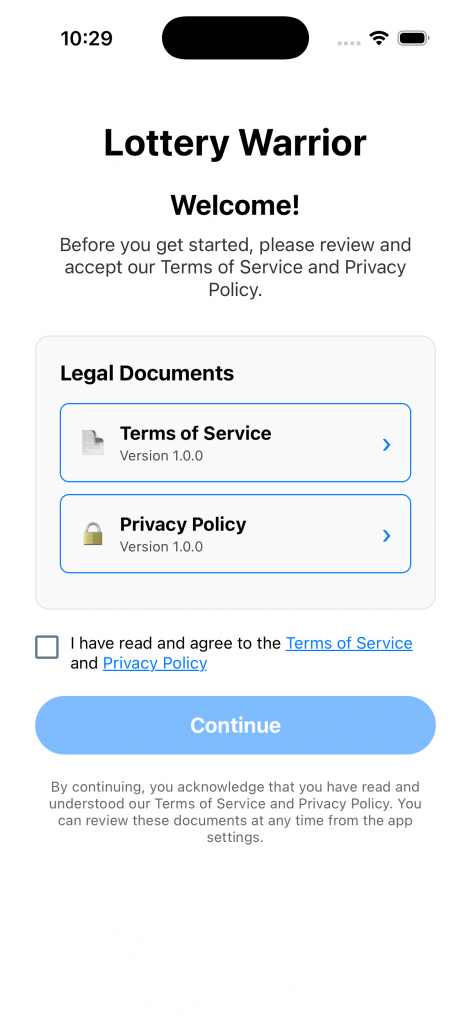
Before using Lottery Warrior, you must accept our Terms of Service and Privacy Policy. This is a one-time requirement on first launch.
What This Screen Does
- Displays our legal terms and conditions
- Explains how we handle your data and privacy
- Requires your explicit consent to proceed
- Stores your acceptance locally (never sent elsewhere)
Important Legal Points
- No Gambling: Lottery Warrior is a number generation and tracking tool. We do not sell lottery tickets or facilitate gambling.
- Data Privacy:
- All your data stays on your device
- We don’t collect personal information
- No account or registration required
- Your lottery numbers are never transmitted to our servers
- No Guarantees:
- Generated numbers are based on statistical strategies
- We make no claims about winning odds
- Lottery games are random – past results don’t predict future outcomes
- Subscription Terms:
- Premium features require paid subscription
- Managed through App Store/Google Play
- Cancel anytime through your app store account
- Free trial period applies to first-time subscribers only
How to Proceed
- Read the terms by clicking the links and scrolling through the document
- Tap “I Accept” to agree and continue to the app
- Must accept to use: The app cannot function without terms acceptance
Already Accepted?
Once you accept the terms, you won’t see this screen again unless you:
- Reinstall the app
- Clear the app’s data/cache
- The terms are significantly updated (you’ll be notified)
Need to Review Later?
You can always review our Terms of Service and Privacy Policy:
- Open the app
- Tap the Help tab in bottom navigation
- Select Terms of Service or Privacy Policy
Questions About Terms?
Contact our support team through the Help screen if you have questions about:
- How we use your data
- Subscription billing
- Your rights and responsibilities
- Account deletion (if applicable)
Dashboard Screen
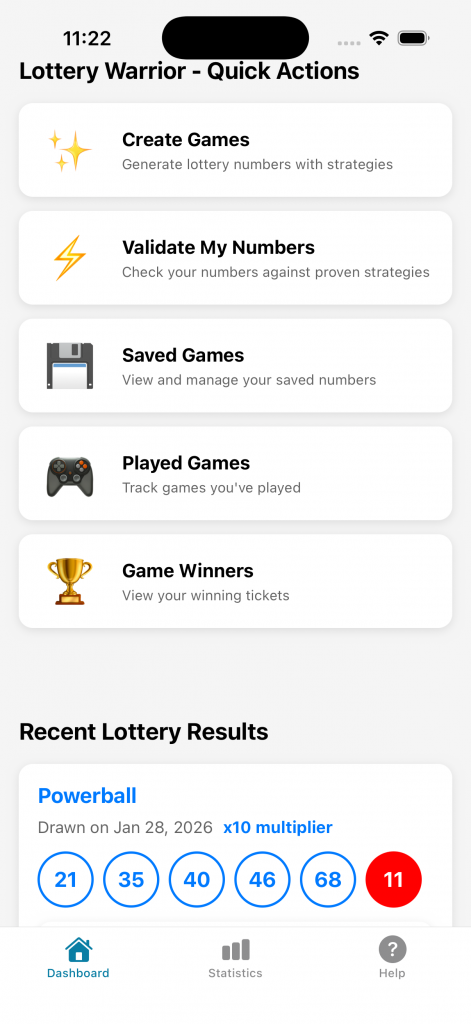
What it does: Your central hub for quick access to all features and lottery information.
Dashboard (screenshot)
How to use:
- See the latest drawing dates for Powerball and Mega Millions
- Quick access cards take you to key features:
- Create Games – Generate new lottery number combinations
- Saved Games – View games you’ve saved for future play **
- Played Games – Track games you’ve already entered in drawings **
- Validate Numbers – Check if your numbers have won
- Winners – View your winning games and prizes **
- Statistics – Analyze lottery number frequency and patterns
** Requires premium subscription
Create Games Screen
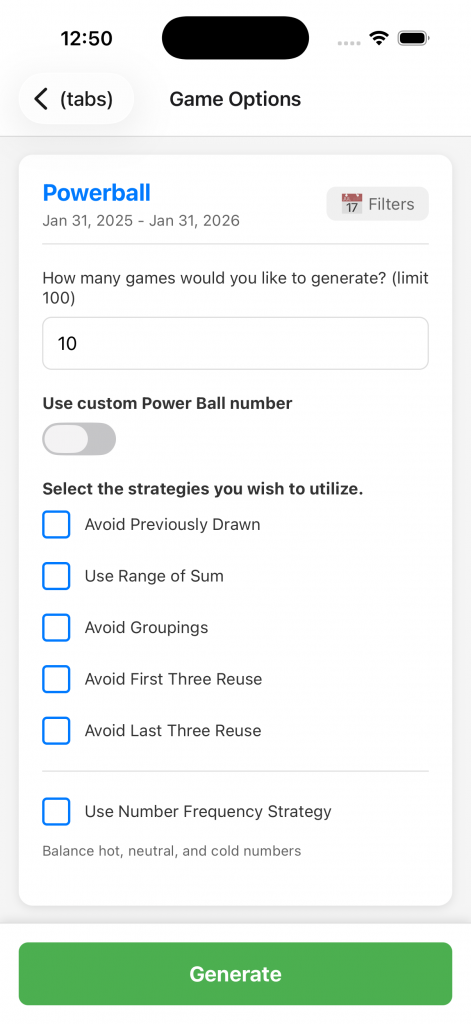
What it does: Generate lottery number combinations using advanced statistical strategies.
Create Games (screenshot)
How to use:
- Click Filters button – Choose between Powerball or Mega Millions, set date range of historical drawings
- Set number of games – Choose how many combinations to generate (1-100)
- Apply strategies (optional):
- Exclude Previously Drawn – Avoid number sets that have already won (Free)
- Range of Sum – Use Gail Howard’s wheeling algorithm **
- Groupings – Avoid too many numbers from the same decade **
- First Three Frequency – Filter based on historical patterns **
- Last Three Frequency – Optimize recent number trends **
- Hot/Cold Hybrid – Balance frequently and rarely drawn numbers **
- Tap “Generate Games” – Your combinations appear on the Generated Games screen
- Save or quick play – Save games for later or mark them as played
Premium tip: Combine multiple strategies for statistically optimized combinations.
** Requires premium subscription
Generated Games Screen
Generated Games (screenshot)
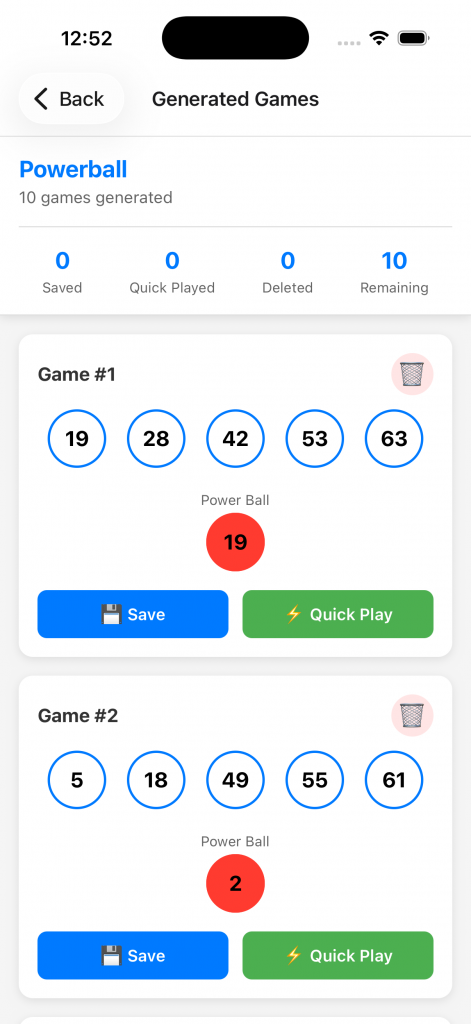
What This Screen Does
The Generated Games screen displays lottery number combinations that you’ve just created using the Create Games feature. This is a temporary holding area where you can review, save, or mark newly generated games as played before they’re stored in your database.
How to Access This Screen
You’ll reach this screen automatically when:
- You tap “Generate Games” on the Create Games screen
- The app successfully generates the requested number of combinations
- The screen displays with all your newly created games
You cannot navigate directly to this screen – it’s only accessible as a result of the generation process.
Screen Layout
Header Section:
- Title: “Generated Games”
- Subtitle showing: Number of games generated and lottery type
- Example: “5 Powerball games generated”
Game Cards:
Each generated game is displayed in a card showing:
- Main Numbers: 5 white lottery balls in ascending order
- Bonus Ball: Red Powerball or gold Mega Ball (larger, separated)
- Action Buttons: Save and Mark as Played options
Available Actions
1. Save Game for Later
What it does: Stores the game combination in your Saved Games list for future use.
How to use:
- Review the number combination
- Tap the “Save” button on the game card
- Game is immediately added to Saved Games screen
- Success message appears
When to use this:
- You like the numbers but aren’t playing them immediately
- You want to track multiple combinations before deciding which to play
- You’re building a collection of favorite number sets
Premium consideration: Free users do not have access to this screen. Premium users get unlimited saves.
2. Mark as Played
What it does: Records that you’ve entered this combination in an official lottery drawing.
How to use:
- Tap “Mark as Played” button on the game card
- Select the drawing date when you’ll play these numbers
- Game moves from Generated to Saved Game and Played Games screens
- You can now track and validate this game after the drawing
When to use this:
- You’ve purchased a lottery ticket with these exact numbers
- You want to track this combination for a specific upcoming drawing
- You’re ready to play immediately
What happens next:
- Game is removed from the Generated Games screen
- Appears in Played Games screen linked to your selected drawing date
- Can be validated after the drawing results are available
3. Delete/Discard
What it does: Removes a generated game you don’t want to keep.
How to use:
- Tap the delete button on the game card
- Confirm deletion (if prompted)
- Game is immediately removed from the list
When to use this:
- You don’t like the number combination
- You generated more games than needed
- You want to regenerate different numbers
Note: Deleted generated games are not recoverable – they aren’t saved anywhere.
Saved Games Screen
What it does: Store and manage lottery combinations you want to play later. (Screen usage requires premium subscription)
Saved Games (screenshot)
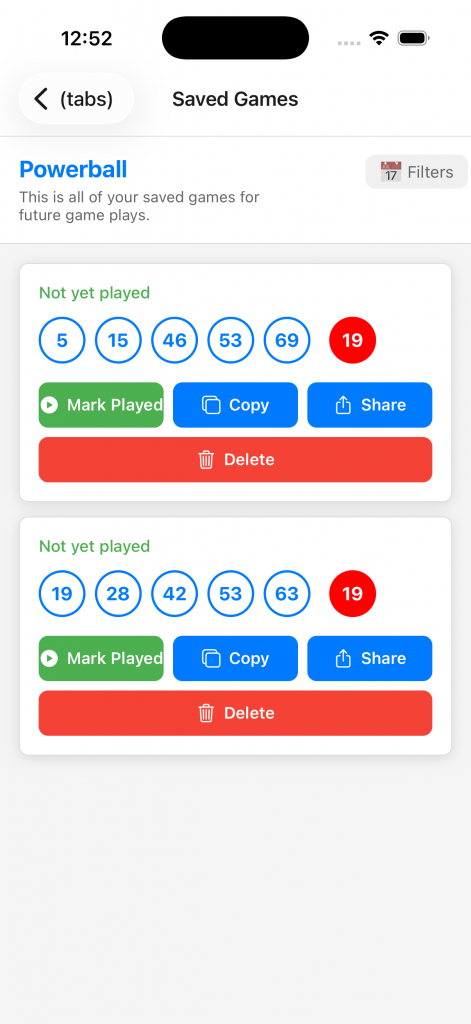
How to use:
- View all your saved game combinations
- Click Filter button to filter by lottery type (Powerball/Mega Millions) and date range o historical drawings
- Mark games as “Played” when you enter them in a drawing
- Delete games you no longer want
Mark Played Screen
What This Screen Does
Mark Played (screenshots)
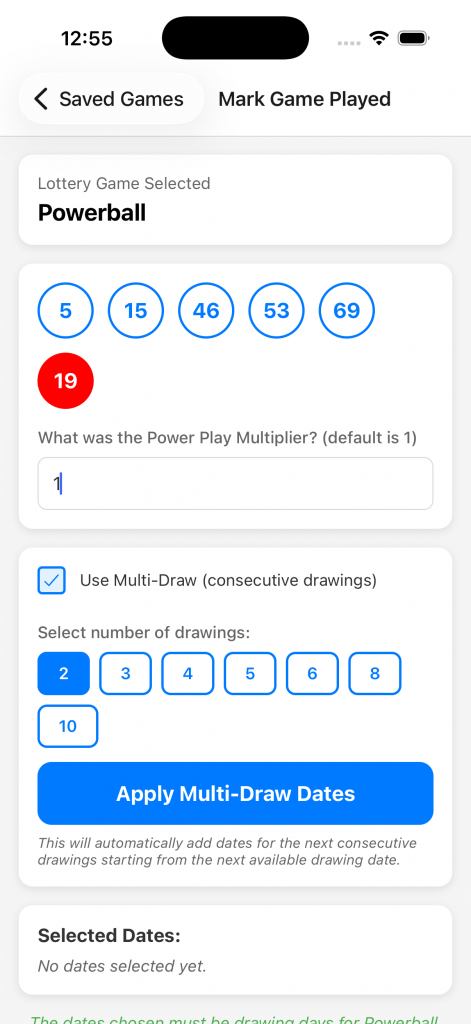
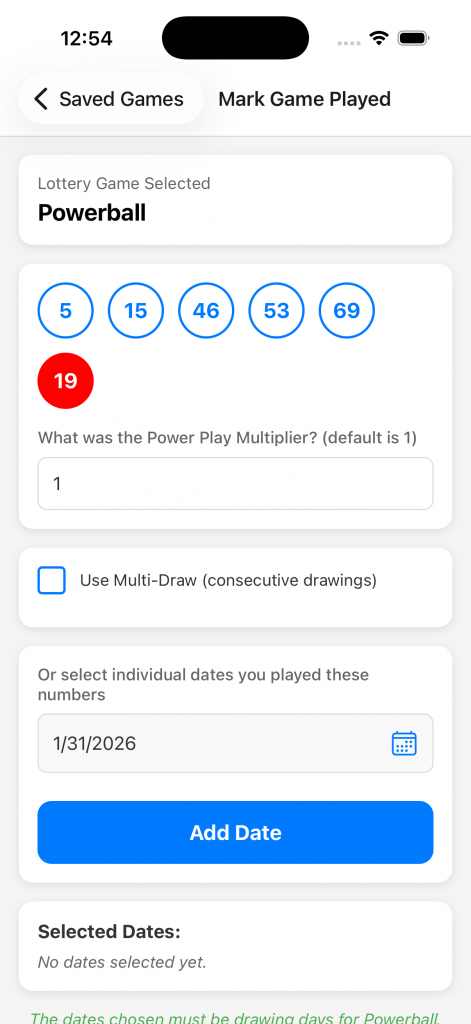
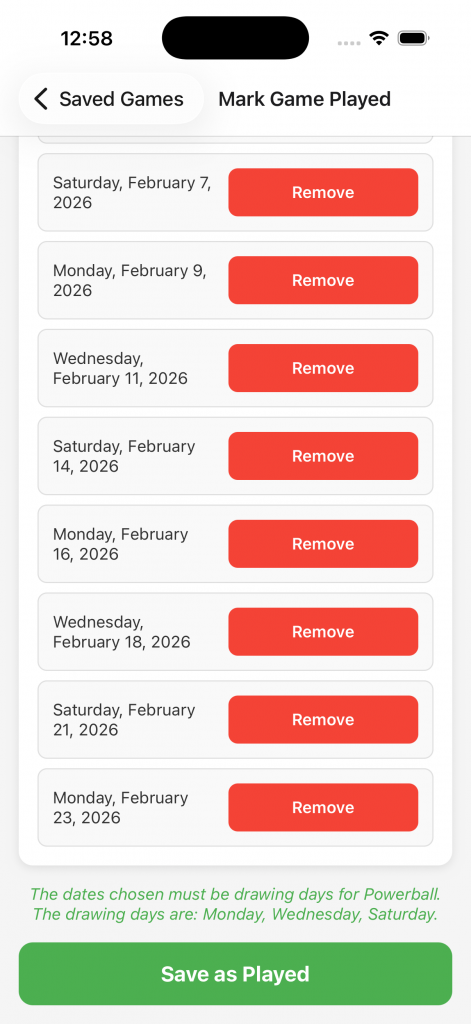
The Mark Played screen allows you to convert saved lottery game combinations into “played games” – tracking that you’ve actually entered these numbers in an official lottery drawing. This is essential for:
- Keeping a record of all tickets you’ve purchased
- Automatically validating your games when drawing results are available
- Never losing track of a potential winning ticket
- Organizing your lottery history by drawing date
When to Use This Screen
You’ll access this screen when:
- You tap “Mark as Played” on a saved game in the Saved Games screen, or click the Quick Play button on Generated Games or Saved Games screens
- You want to record that you’ve purchased a lottery ticket with specific numbers
- You’re about to play numbers in an upcoming drawing and want to track them
How the Screen Works
Step-by-Step Process:
- Game Information Display
- The screen shows your selected lottery game at the top
- You’ll see the lottery type (Powerball or Mega Millions)
- The game’s numbers are prominently displayed with colored balls
- Main numbers appear in white/themed balls
- Powerball (red) or Mega Ball (gold) shown separately
- Select Drawing Date
- Tap the date picker to open a calendar
- Choose the drawing date when you plan to play these numbers
- For Powerball: Drawings are Monday, Wednesday, Saturday
- For Mega Millions: Drawings are Tuesday, Friday
- You can select past dates (if you already played) or future dates (upcoming drawings)
- The date displays in your local timezone
- Confirm & Save
- Review your selection – Make sure the date and numbers are correct
- Tap “Mark as Played” button at the bottom
- The game is immediately moved from “Saved Games” to “Played Games”
- You’ll see a success message
- The screen automatically navigates back to Played Games
- What Happens After Marking as Played
- Once you mark a game as played:
- Moved to Played Games – The game is removed from your Saved Games list and added to Played Games
- Drawing Association – The game is now linked to the specific drawing date you selected
- Automatic Validation Ready – When that drawing’s results are available, the Played Game will automatically be validated
- Permanent Record – The game stays in your Played Games history until you manually delete it
- Winner Detection – If the game wins, it will be displayed in your Winners list after validation
- Important Details
- Drawing Date Selection:
- Always select the actual drawing date, not the ticket purchase date
- If you’re unsure of the next drawing date, check the Dashboard for upcoming drawings
- You can mark games for future drawings (helps with pre-planning)
- Past drawing dates are allowed if you’re entering historical tickets
Database Storage:
The game is stored with:
- All lottery numbers (main numbers + powerball/mega ball)
- Drawing date you selected
- Lottery type (Powerball or Mega Millions)
- Timestamp of when you marked it as played
- Unique game ID for tracking
Cannot Be Undone Easily:
- Once marked as played, the game still exists in Saved Games and will display the number of times you have marked the game as played
- To “unmark” it, you’d need to delete it from Played Games and it will no longer be reflected in Saved Games
- Double-check the drawing date before confirming
Common Use Cases
Scenario 1: Regular Player
- Generate games on Monday using Create Games screen
- Save your favorite combinations
- Buy lottery tickets on Wednesday with those numbers
- Open Saved Games → Mark as Played
- Select Wednesday’s drawing date
- After the drawing, go to Played Games and validate
Scenario 2: Batch Entry
- You’ve generated 5 game combinations you like
- Save all 5 games
- You plan to play all 5 in the next drawing
- Mark each one as played with the same drawing date
- All 5 are now tracked together in Played Games
Scenario 3: Historical Tracking
- You have old lottery tickets from past drawings
- Manually enter the numbers in Create Games
- Save the game
- Mark as played with the historical drawing date
- Validate against that drawing’s results
Tips for Best Results
✅ Do This:
- Mark games as played immediately after purchasing tickets
- Double-check the drawing date before confirming
- Keep physical tickets until after validation
- Use the app consistently to track all your plays
❌ Avoid This:
- Don’t mark games as played for drawings that already occurred (unless entering historical data)
- Don’t select the wrong lottery type’s drawing date (Powerball vs Mega Millions have different schedules)
- Don’t mark the same numbers multiple times for the same drawing (creates duplicates)
** Requires premium subscription
Played Games Screen
What it does: Track lottery tickets you’ve entered in official drawings.
Played Games (screenshot)
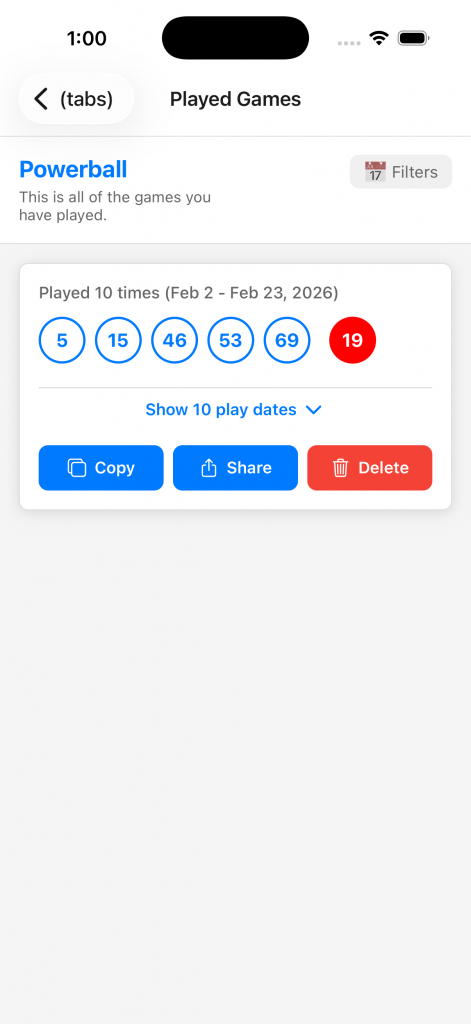
How to use:
- View your played games – See all combinations you’ve entered
- Associate with drawings – Link each game to the drawing date you played
- Validate results – The app automatically checks if you’ve won when drawing results are available upon opening the app
- View by lottery – Filter Powerball and Mega Millions separately
- Delete old games – Remove games from past drawings
Why track played games? Never lose a ticket or forget to check your numbers!
** Requires premium subscription
Validate Numbers Screen
What This Screen Does
Validate Numbers (screenshots)
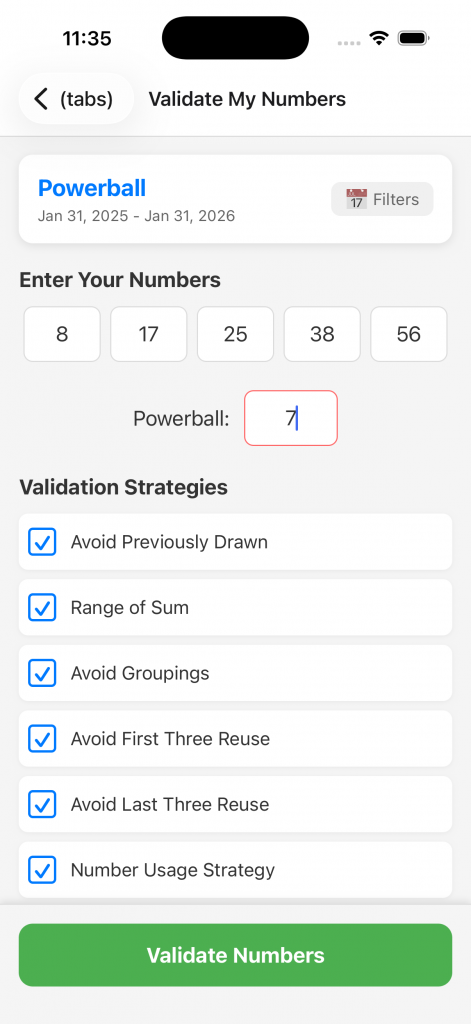
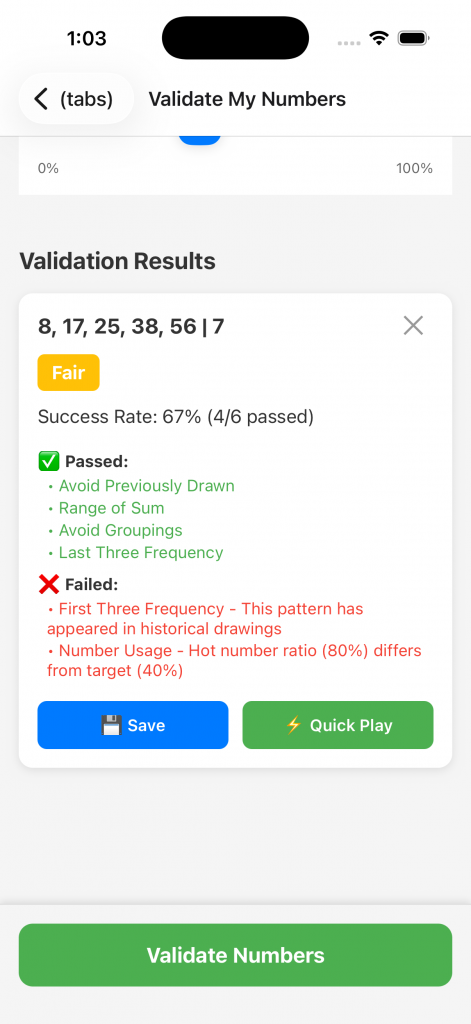
The Validate Numbers screen checks lottery numbers against official drawing results to determine if it is within the strategies that you select by ranking them as Poor, Fair, Good, Very Good, or Excellent.
How to Use This Screen
Step-by-Step Process:
- Select Lottery Type
- Tap the Filters button at the top to choose Powerball or Mega Millions
- Default is Powerball if none selected
- Enter Your Numbers:
- Tap each number field to open a number pickerFor Powerball: Select 5 main numbers (1-69) + 1 Powerball (1-26)For Mega Millions: Select 5 main numbers (1-70) + 1 Mega Ball (1-25)Numbers appear in lottery ball graphics as you enter them
- Select Validation Strategies
– Avoid Previously Drawn (free)
– Range of Sum **
– Avoid Groupings **
– Avoid First Three Reuse **
– Avoid Last Three Reuse **
– Number Usage ** - Validate
- Tap the “Validate Numbers” button at the bottom
- The app compares your numbers to each selected strategy algorithm
- Results appear immediately showing:
- Popup message displaying results of your numbers against the strategy algorithms. (Poor, Fair, Good, Very Good, Excellent)
- Validation results will be at the bottom of the screen for each number set you enter
- Validation Results
- View the results for each number you enter. The results will display which selected strategies have passed or failed validation
- You will have the option to Save for later use, or Quick Play to immediately add to your Played Games **
** Requires premium subscription
Game Winners Screen
What it does: Celebrate and track all your winning lottery combinations.
Note: Played games are automatically checked for winners every time you open the app.
How to use:
- View all games that have won prizes
- See prize amounts for each win
- Track your total winnings over time
- Share your wins (optional)
You won! This is where your success stories live.
Statistics Screen
Statistics (screenshot)
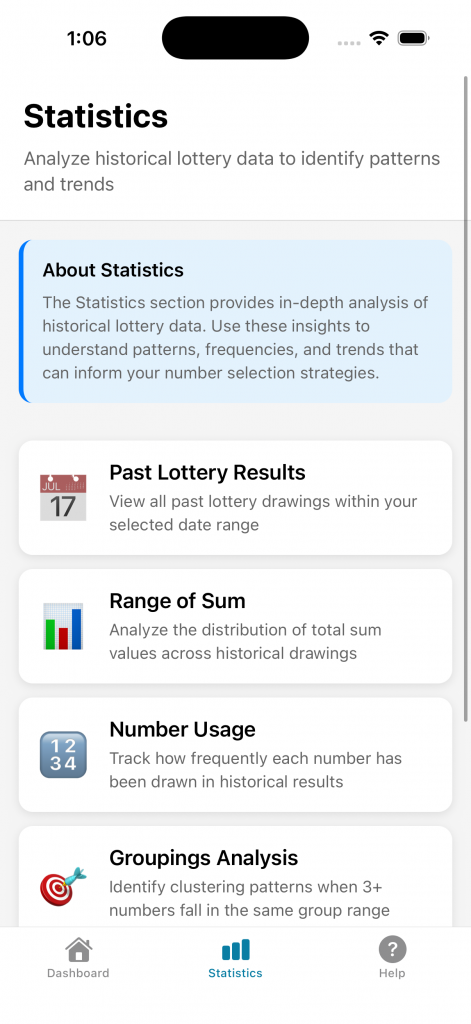
The Statistics screen is a navigation hub that provides access to various in-depth analytical tools. Each card links to a specific statistical analysis screen that helps you understand lottery patterns and trends.
Available Statistics Pages:
- 📊 Range of Sum – Analyze total sum distribution patterns
- 🔢 First Three Frequency – Track frequency of numbers in positions 1-3
- 🎯 Last Three Frequency – Track frequency of numbers in positions 3-5
- 📈 Groupings Analysis – Analyze number distribution across decades
- 💡 Number Usage – Hot/cold number tracking and trends
- 📅 Past Results – Complete historical drawing database
Simply tap any card to open that analysis screen.
Range of Sum Statistics
Range of Sum (screenshots)
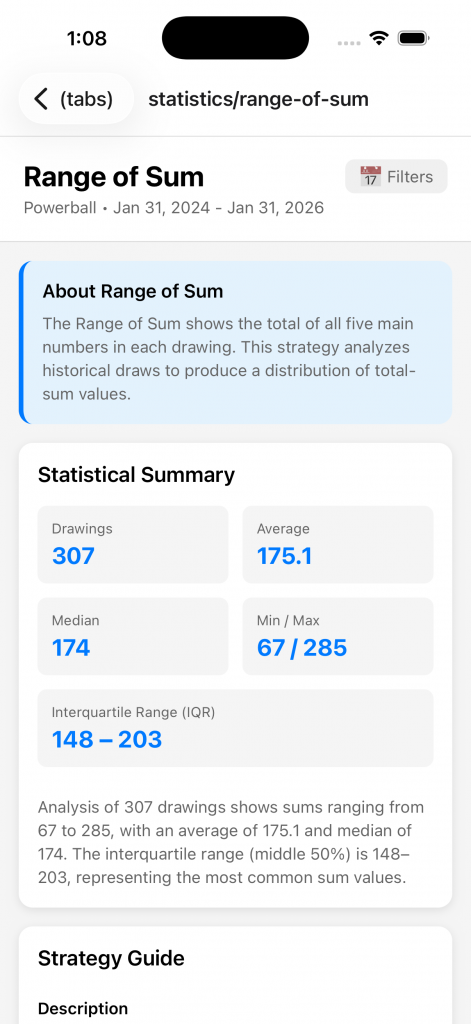
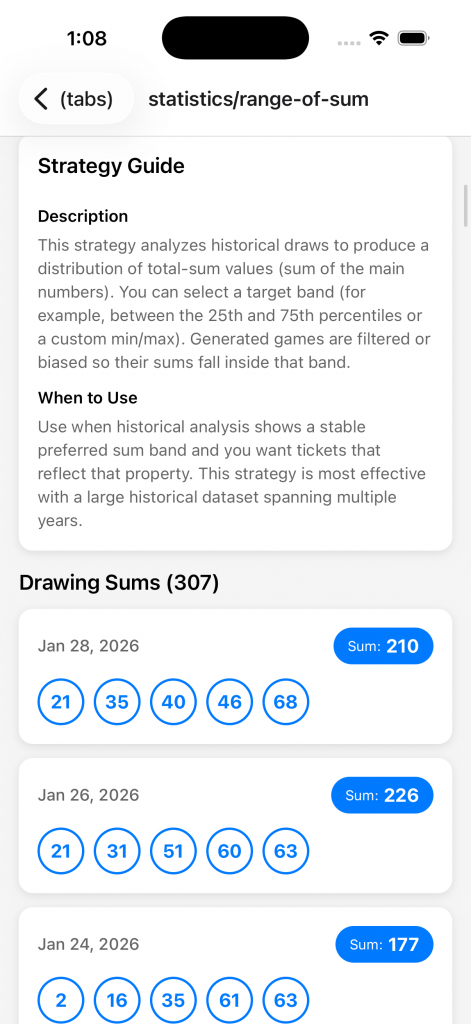
What This Screen Does
Analyzes the total sum of winning number combinations across all historical drawings. This helps identify which sum ranges appear most frequently and can inform your number selection strategy.
How to Use
- Click Filters Button
- Use the filters button at the top to choose Powerball or Mega Millions
- Set a date range of historical drawings
- Statistical Summary
- Drawings: The number of drawings in the date range selected
- Average: The average sum of all drawings in the date range
- Median: The median average sum of all drawings in the date range
- Min/Max: Min is the lowest sum and Max is the highest sum found in the drawings in the date range
- Interquartile Range (IQR): This is the spread of the middle 50% of the total sums of drawings in the date range
- Interpret the Data
- The sum is calculated by adding all 5 main numbers (excludes Powerball/Mega Ball)
- Example: Numbers 5, 12, 23, 31, 45 = Sum of 116
- Historical data shows certain sum ranges appear more frequently
- Use this to validate your generated games fall within common ranges
Understanding Sum Distribution
Why Sum Matters:
- True random draws tend to cluster around the mean sum
- Extremely low sums (all small numbers) are rare
- Extremely high sums (all large numbers) are rare
- Most winning combinations fall in the middle ranges
Practical Application
When Generating Games:
- Note the most common sum ranges from this screen
- In Create Games, enable “Range of Sum” strategy (Premium)
- Your generated games will statistically align with historical patterns
When Validating Ideas:
- Manually add up your 5 main numbers
- Check if the sum falls in a common range
- If it’s in a rare range, consider adjusting numbers
- Balance between common ranges and your preferred numbers
Premium Feature Integration
This is a free feature – all users can view range of sum statistics.
However, the Range of Sum Strategy in Create Games (which filters generated games by sum) is a Premium feature that uses Gail Howard’s algorithm.
First Three Frequency Statistics
First Three Frequency (screenshots)
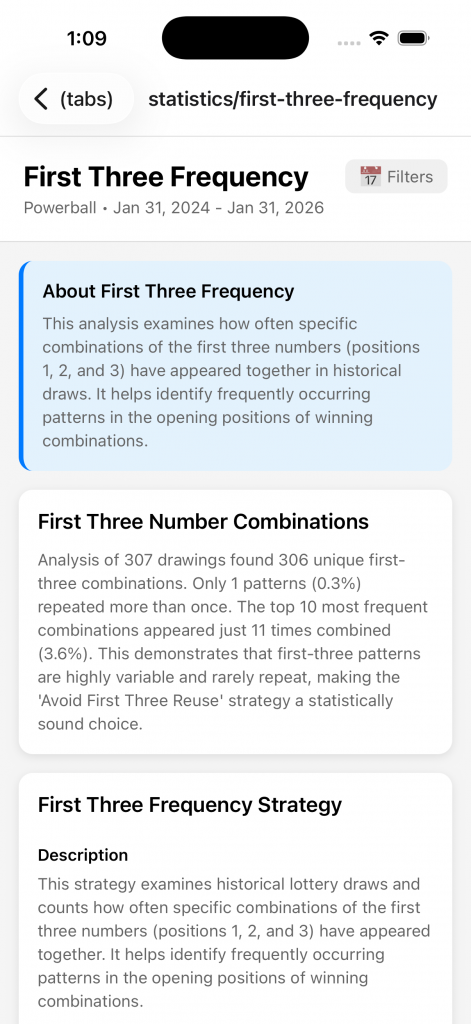
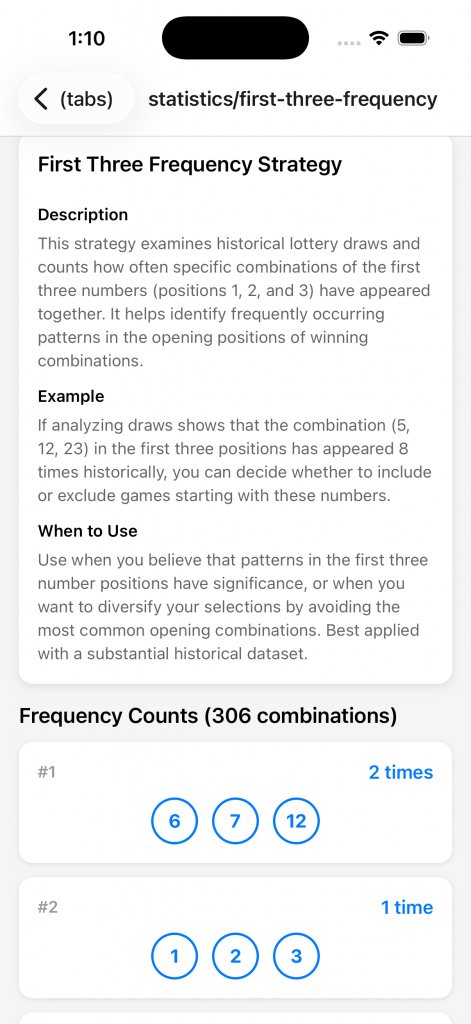
What This Screen Does
Tracks how often each number appears in the first three positions (positions 1, 2, and 3) of winning combinations when numbers are sorted in ascending order.
How to Use
- Click Filters Button
- Choose Powerball or Mega Millions from the dropdown
- Set date range of historical drawings to use
- View Frequency Table
- Lists all possible numbers (1-69 for Powerball, 1-70 for Mega Millions)
- Shows count of how many times each number appeared in positions 1-3
- Sorted by frequency (most frequent at top)
- Read the Data
- Number: The lottery number (e.g., 7, 23, 45)
- Count: How many times it appeared in positions 1-3
- Percentage: What % of all drawings included this number in first three
Understanding Position Frequency
Why First Three Positions Matter:
- Winning combinations are always displayed in ascending order
- Position 1 = smallest number in the combination
- Position 2 = second smallest number
- Position 3 = third smallest number
- Lower numbers (1-23) naturally appear more often in these positions
- But some low numbers may be “due” if they haven’t appeared recently
Pattern Recognition:
- If a low number (e.g., 5) appears infrequently in first three, it might be “overdue”
- If a mid-range number (e.g., 30) appears often in position 3, it’s “hot”
- Avoid combinations where all first three numbers are cold
Practical Application
When Creating Games:
- Note which low numbers are hot vs. cold
- In Create Games, enable “First Three Frequency” strategy (Premium)
- Strategy will prefer numbers that historically appear in positions 1-3
- Balance hot numbers with your preferred picks
Strategy Examples:
- Conservative: Pick first three numbers from the “hot” list
- Aggressive: Pick “due” numbers that haven’t appeared recently
- Balanced: Mix 1-2 hot numbers with 1-2 due numbers
Premium Feature Integration
This is a free feature – viewing statistics is available to all users.
The First Three Frequency Strategy in Create Games (which filters games based on this data) is a Premium feature.
Last Three Frequency Statistics
Last Three Frequency (screenshots)
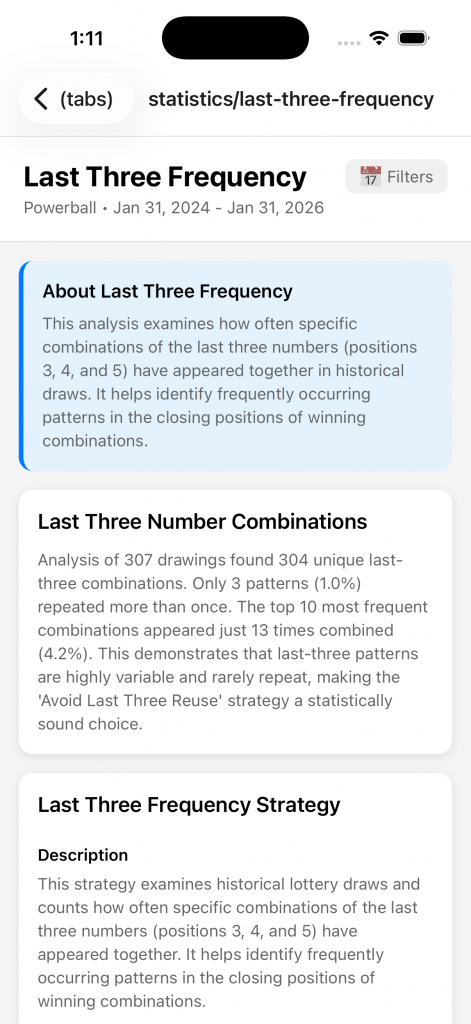
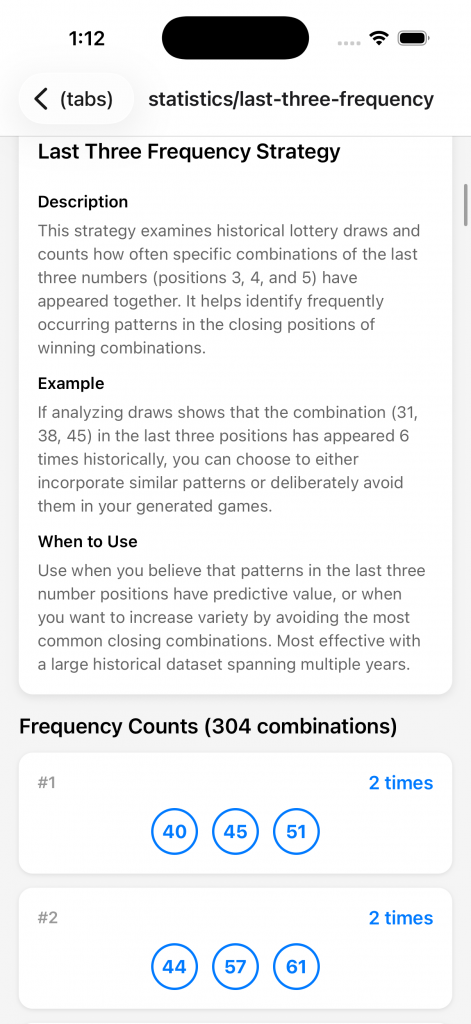
What This Screen Does
Tracks how often each number appears in the last three positions (positions 3, 4, and 5) of winning combinations when numbers are sorted in ascending order.
How to Use
- Click the Filters Button
- Choose Powerball or Mega Millions
- Set date range of historical drawings
- View Frequency Table
- Lists all numbers with their position 3-5 appearance counts
- Sorted by frequency
- Color coding for hot/cold numbers
- Higher numbers (40-69/70) naturally dominate this list
- Read the Data
- Number: The lottery number
- Count: Times it appeared in positions 3-5
- Percentage: % of drawings with this number in last three
- Last Seen: Most recent appearance in positions 3-5
Understanding Last Position Frequency
Why Last Three Positions Matter:
- Position 3 = middle number (can appear in first three OR last three stats)
- Position 4 = second largest number
- Position 5 = largest number in the combination
- Higher numbers (40+) naturally appear more often here
- But some high numbers may be underperforming
Pattern Insights:
- If a high number (e.g., 65) rarely appears in last three, it’s “cold”
- If a mid-range number (e.g., 45) appears often in positions 4-5, it’s “hot”
- Balance is key – don’t pick all hot or all cold numbers
Practical Application
When Creating Games:
- Check which high numbers are trending
- Enable “Last Three Frequency” strategy in Create Games (Premium)
- Strategy filters for numbers with strong position 3-5 history
- Combine with other strategies for optimal results
Strategy Examples:
- Follow Trends: Pick high numbers currently appearing frequently
- Buck Trends: Pick “due” high numbers that haven’t hit recently
- Balanced Approach: Mix trending and due numbers
Premium Feature Integration
Viewing statistics is free for all users.
Using the Last Three Frequency Strategy in Create Games is a Premium feature.
Groupings Analysis Statistics
Groupings Analysis (screenshots)
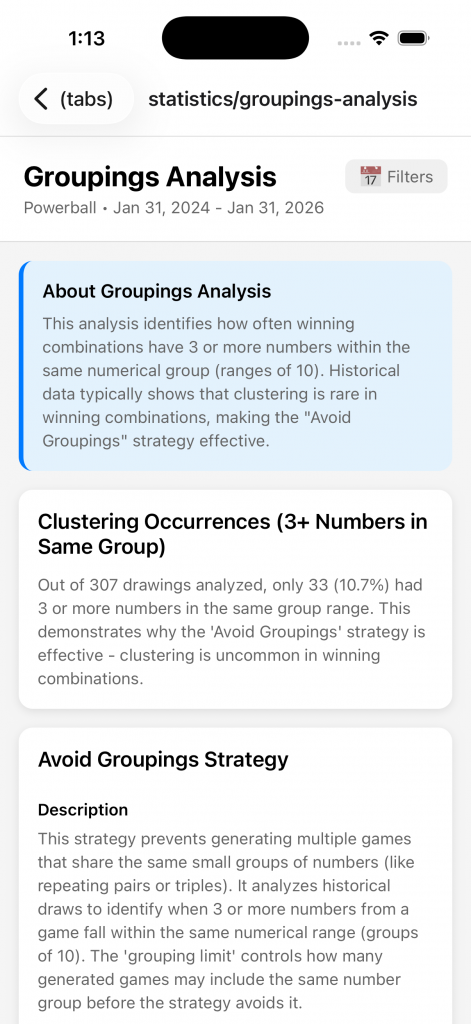
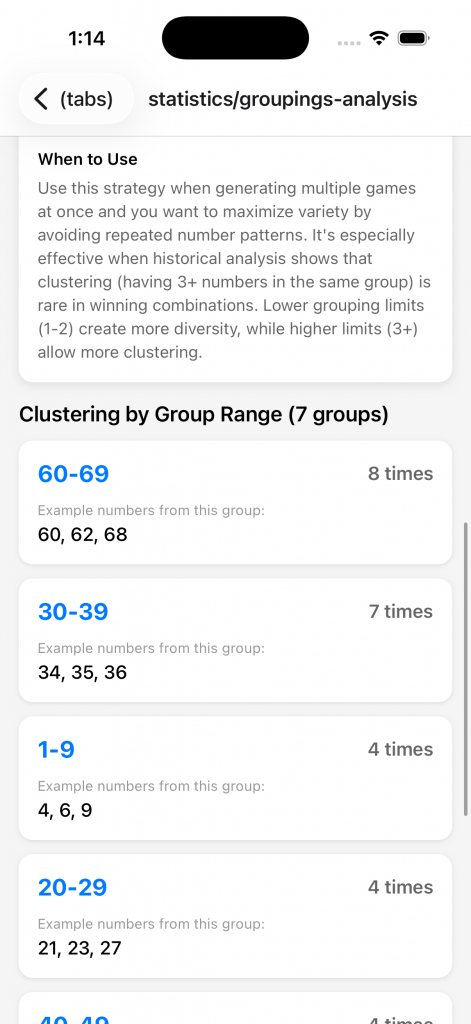
What This Screen Does
Analyzes how winning numbers are distributed across numerical groups (decades: 1-10, 11-20, 21-30, etc.). This reveals patterns in how numbers cluster or spread across ranges.
How to Use
- Click Filters button
- Choose Powerball or Mega Millions
- Set date range of historical drawings
- View Clustering Occurrences
- Number of times a number grouping occurred in the total drawings within the date range
Understanding Grouping Patterns
Why Groupings Matter:
- Purely random draws tend to spread across multiple groupings
- Having all 5 numbers from one grouping (e.g., all 20s) is extremely rare
- Having 0 numbers from some groupings is common
- Historical data shows certain distribution patterns repeat
Common Patterns:
- Balanced: Numbers spread across 4-5 different groupings
- Clustered: 2-3 numbers from one grouping, scattered elsewhere
- Avoid: All numbers from 1-2 groupings (statistically unlikely)
For Powerball (1-69):
- Groupings: 1-10, 11-20, 21-30, 31-40, 41-50, 51-60, 61-69
- Most winning combinations span 4-5 different groupings
For Mega Millions (1-70):
- Groupings: 1-10, 11-20, 21-30, 31-40, 41-50, 51-60, 61-70
- Similar distribution patterns to Powerball
Practical Application
When Creating Games:
- Note the most common grouping patterns
- Enable “Groupings” strategy in Create Games (Premium)
- Strategy ensures your generated games match historical distribution patterns
- Avoid combinations that violate common grouping rules
Manual Validation:
- Look at your chosen numbers
- Count how many are in each grouping
- Compare to common patterns on this screen
- Adjust if your distribution is historically rare
Strategy Tip:
- Don’t pick 3+ numbers from the same grouping unless data shows that pattern is common
- Spread numbers across at least 3-4 different groupings
- Use this screen to validate that your “gut feeling” numbers follow realistic patterns
Premium Feature Integration
Viewing groupings analysis is free for all users.
The Groupings Strategy in Create Games (which filters games to match historical patterns) is a Premium feature.
Number Usage Statistics
Number Usage (screenshots)
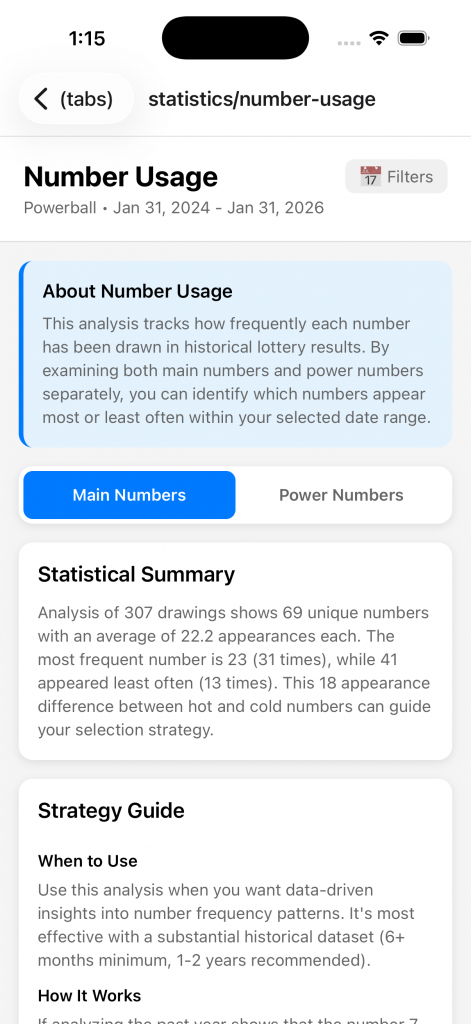
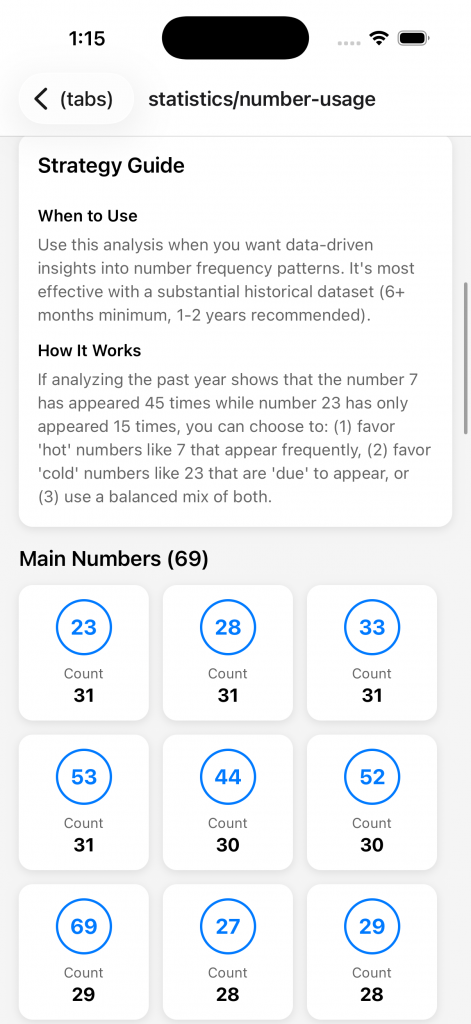
What This Screen Does
Provides comprehensive hot/cold number analysis tracking which numbers are currently trending (hot) or overdue (cold) based on recent drawing history.
How to Use
- Click Filters Button
- Choose Powerball or Mega Millions
- Set Date Range for historical drawings
- View Two Tabs
A. Main Numbers- The total counts of each number in the 5 main numbers. Ordered by highest count.
- The total counts o each number in the power numbers. Ordered by highest count.
- Statistical Summary
This will display the total number of drawings within the date range selected and give a summary of the total counts.
Understanding Hot vs. Cold
Hot Numbers:
- Drawn frequently in recent history
- “On a streak” – appearing multiple times recently
- Some players prefer hot numbers (ride the streak)
- Statistical note: Past draws don’t influence future draws (each draw is independent)
Cold Numbers:
- Rarely drawn or haven’t appeared recently
- “Overdue” – statistically likely to appear soon (gambler’s fallacy – not actually true)
- Some players prefer cold numbers (they’re “due”)
- Reality: Cold numbers have the same odds as hot numbers in next drawing
Neutral Numbers:
- Appearing at expected frequency
- Not notably hot or cold
- Balanced option for conservative players
The Truth About Hot/Cold:
- Lottery drawings are independent random events
- Past results DO NOT predict future results
- Hot/cold analysis is for pattern recognition and player preference, not prediction
- Use this data to inform strategy, but remember: all numbers have equal odds in next draw
Practical Application
Strategy Approaches:
1. Ride the Hot (Momentum Strategy)
- Pick mostly hot numbers
- Theory: Patterns continue short-term
- Reality: Psychological preference, not mathematical advantage
2. Play the Cold (Contrarian Strategy)
- Pick mostly cold numbers
- Theory: These numbers are “due”
- Reality: Gambler’s fallacy, but numbers will eventually hit
3. Hot/Cold Hybrid (Balanced Approach – Recommended)
- Mix hot and cold numbers
- 2-3 hot numbers + 2-3 cold numbers
- Diversifies your approach
- This is what the “Hot/Cold Hybrid” Premium strategy does
When Creating Games:
- Review current hot/cold numbers
- Enable “Hot/Cold Hybrid” strategy in Create Games (Premium)
- Strategy automatically balances hot and cold numbers
- Or manually pick numbers informed by this data
Premium Feature Integration
Viewing number usage statistics is free for all users.
The Hot/Cold Hybrid Strategy in Create Games (which auto-balances hot/cold numbers) is a Premium feature.
Past Results (Drawing History)
Past Results (screenshots)
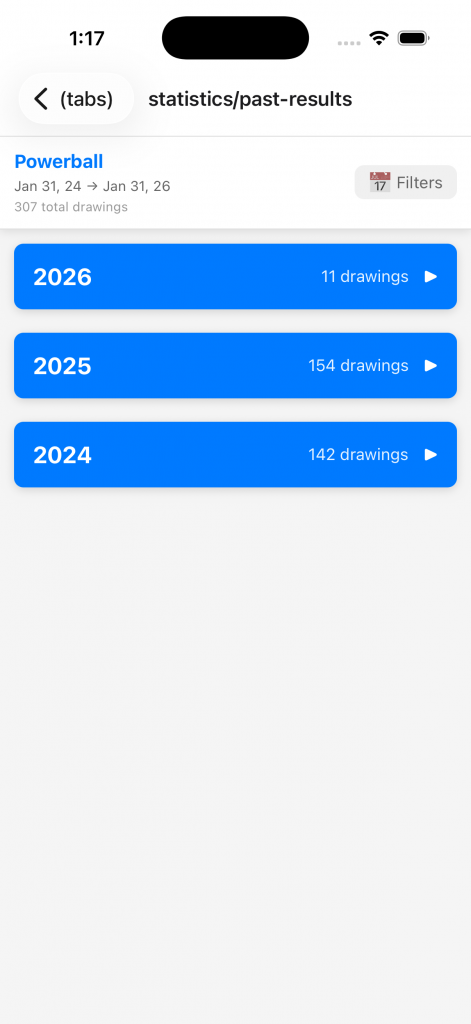
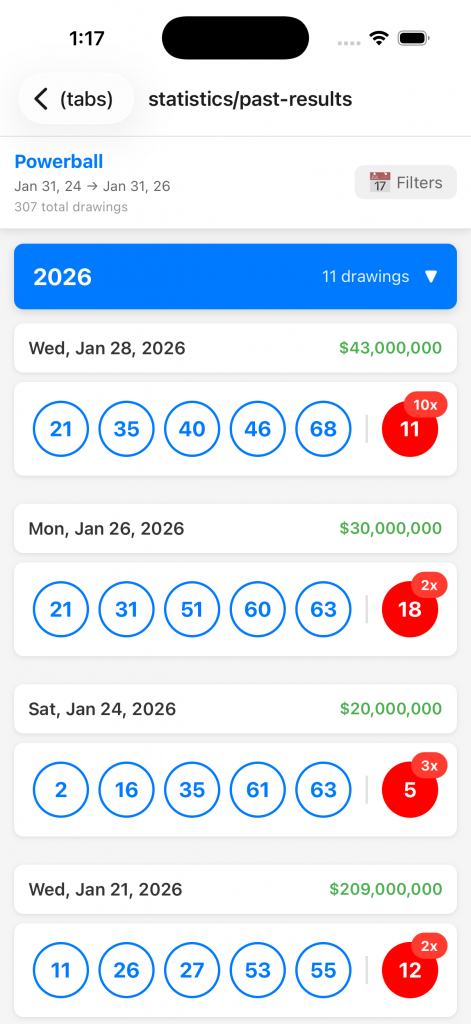
What This Screen Does
Complete searchable database of all historical lottery drawings. View every winning combination, jackpot amount, and drawing date since 2010.
How to Use
- Click Filters Button
- Choose Powerball or Mega Millions from dropdown
- Set date range of historical drawings
- Browse Drawings
- Displays most recent drawings first (reverse chronological)
- Each card shows:
- Drawing Date
- Winning 5 main numbers (in ascending order)
- Powerball/Mega Ball number
- Jackpot amount (if available)
Understanding the Data
What’s Included:
- Powerball: All drawings from October 2015 to present (when format changed to 1-69 + 1-26)
- Mega Millions: All drawings from October 2017 to present (when format changed to 1-70 + 1-25)
- Earlier drawings use older formats and may not be included
Data Sources:
- Official lottery API integrations
- Imported during first app launch
- Updated automatically when app detects new drawings
- Stored locally in SQLite database
Accuracy:
- All data verified against official lottery websites
- Jackpot amounts may be estimated for older drawings
Practical Applications
1. Verify Drawing Results
- You played numbers on a specific date
- Search for that date in Past Results
- Compare your numbers to winning numbers
- Cross-reference with Validate Numbers screen
2. Research Number Patterns
- Search for a specific number (e.g., “7”)
- See every drawing where 7 appeared
- Note which other numbers appeared with it
- Identify pairing patterns (not predictive, but interesting)
3. Track Jackpot Trends
- Sort by jackpot amount
- See largest jackpots in history
- Note when jackpots tend to grow (longer periods without winner)
- Understand odds remain the same regardless of jackpot size
4. Historical Analysis
- Browse year-by-year to see all drawings
- Count how often your favorite numbers appeared
- See complete historical context for frequency statistics
- Combine with other statistics screens for deeper analysis
5. Validate App Data
- Cross-check app’s statistics with raw drawing data
- Verify frequency counts manually
- Confirm app’s analysis is based on complete data set
- Trust but verify the statistical tools
Using Statistics Together
Comprehensive Analysis Workflow
The true power of the Statistics section comes from using multiple screens together:
Step 1: Understand the Baseline (Past Results)
- Review historical drawings to understand the data set
- Get familiar with typical winning combinations
- Note any obvious patterns (or lack thereof)
Step 2: Analyze Position Patterns (First/Last Three Frequency)
- See which numbers commonly appear in early positions
- Identify which numbers dominate late positions
- Note any numbers that cross boundaries (appear in both)
Step 3: Check Distribution (Groupings Analysis)
- Understand how numbers spread across groupings
- Identify common grouping patterns
- Avoid unrealistic clustering
Step 4: Review Current Trends (Number Usage)
- See which numbers are hot vs. cold right now
- Decide on hot/cold/hybrid approach
- Set time period based on your strategy preference
Step 5: Validate Sum Ranges (Range of Sum)
- Check typical sum ranges for your lottery
- Ensure your number selections fall within common ranges
- Adjust if sum is too extreme
Step 6: Generate Games (Create Games Screen)
- Apply relevant Premium strategies based on your analysis
- Let the app filter using statistical algorithms
- Generate multiple games with different strategy combinations
Step 7: Track & Validate
- Save generated games
- Mark as played when you purchase tickets
- Validate after drawings using Validate Numbers screen
- Track winners and analyze what worked
Strategy Recommendations
Conservative Player:
- Focus on hot numbers (Number Usage)
- Stay within common sum ranges (Range of Sum)
- Follow typical grouping patterns (Groupings Analysis)
- Use all statistics to play “by the book”
Aggressive Player:
- Target cold numbers (Number Usage)
- Explore less common sum ranges (Range of Sum)
- Try unconventional grouping patterns (Groupings Analysis)
- Take calculated risks based on data
Balanced Player (Recommended):
- Mix hot and cold numbers
- Vary sum ranges within common boundaries
- Alternate between common and uncommon grouping patterns
- Use statistics to inform choices, not dictate them
Remember
📊 Statistics are descriptive, not predictive
- All analysis is based on historical data
- Past draws do not influence future draws
- Every number has equal odds in the next drawing
- Use statistics to understand patterns, not to guarantee wins
🎲 Lottery is still random
- No strategy guarantees winning
- The house always has the edge
- Play responsibly within your budget
- Statistics make the game more interesting, not more winnable
✅ Statistics help you play smarter
- Avoid number combinations that have never occurred historically
- Understand what “typical” winning combinations look like
- Make informed decisions rather than purely random picks
- Enjoy the analytical aspect of the game